Driving & Street Crossing Scenarios with SightLab

September 11, 2026

Explore attention and behavior from the driver’s seat or the sidewalk.

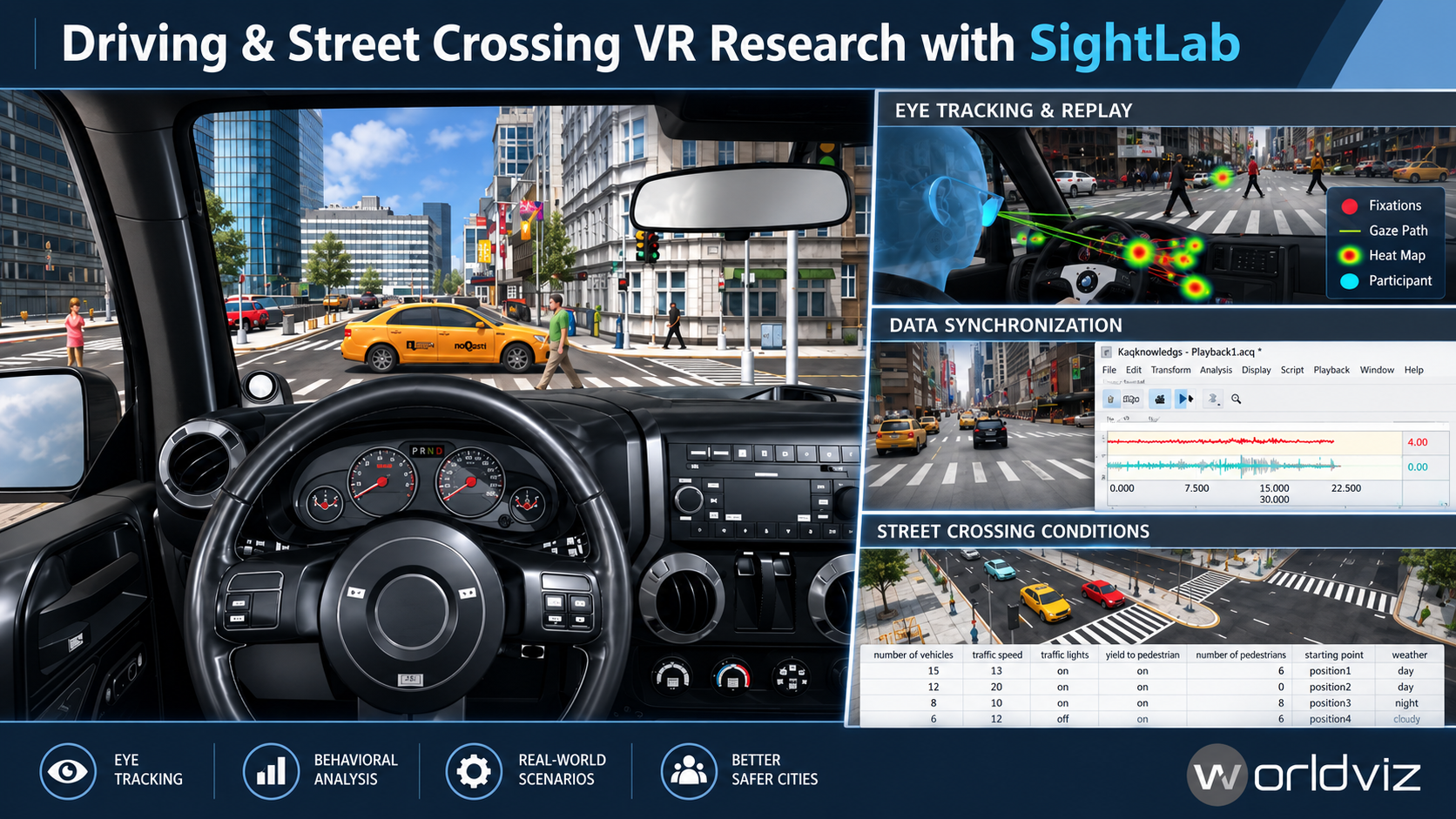
How does an approaching vehicle change where someone looks—and when they decide to act? SightLab’s Driving and Street Walking examples provide customizable starting points for studying driver attention, pedestrian crossing decisions, traffic perception, and navigation in immersive environments. Combine controlled traffic, participant movement, eye tracking, experiment events, and Session Replay in one research workflow.

Watch this video below demonstrating some of the features: 

https://www.youtube.com/watch?v=Hnpqp94hr0s


Find additional documentation here Driving Example | Street Walking Example 

Two perspectives. One research workflow.

Driving: Put participants behind the wheel using desktop, VR, gamepad, or supported steering-wheel controls. The example includes gas, brake, and steering inputs, Drive/Reverse shifting, speed-sensitive steering, collision handling, and elevation support. Configurable vehicle models can include animated steering wheels, RPM and MPH gauges, tires, headlights, and engine audio that changes with speed. A HUD can display speed, fixations, time, and gear status.
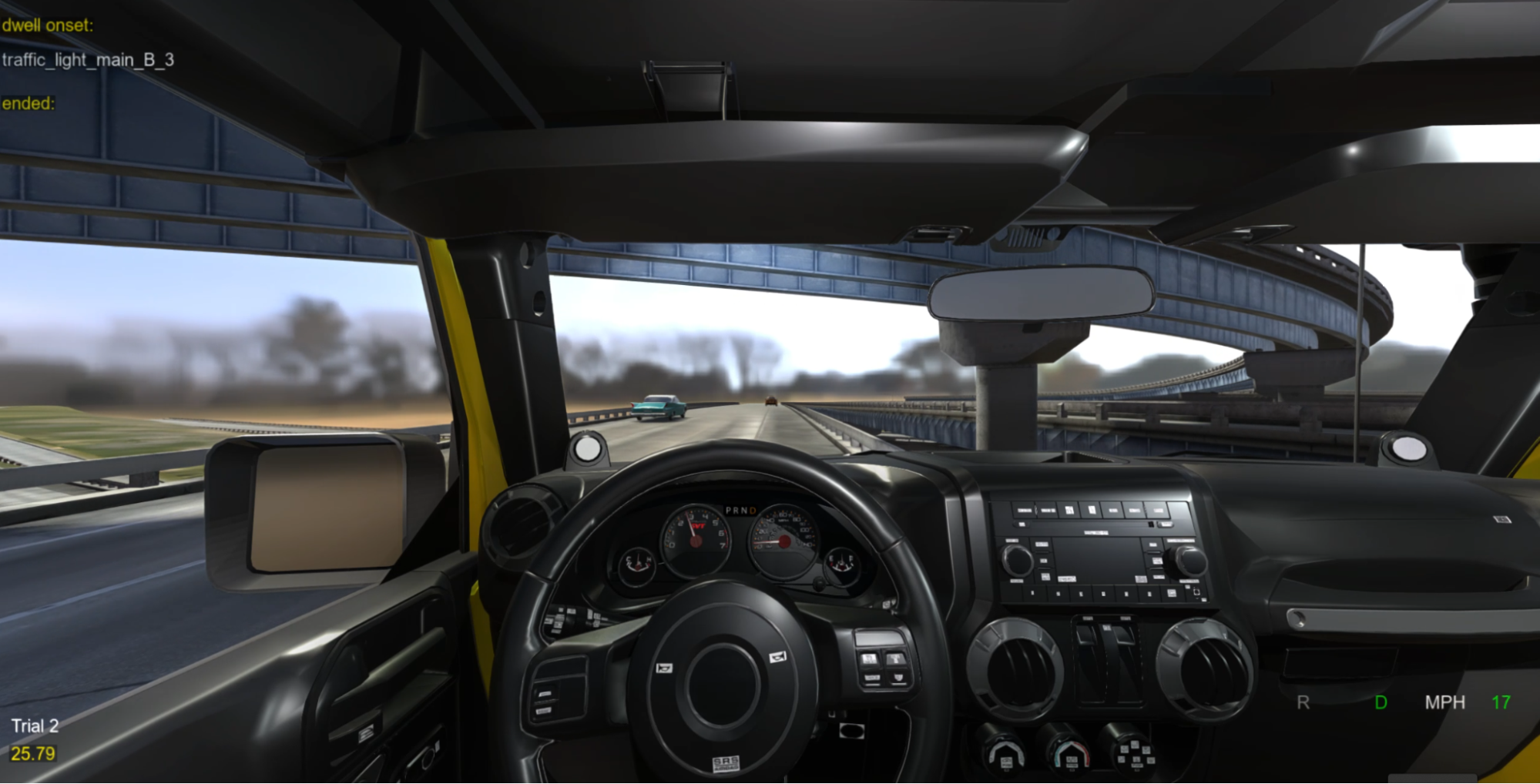
The Driving Example combines customizable vehicle controls, traffic, and eye-tracking data collection.

Street walking: Let participants physically or virtually move through a street environment while studying visual search, approach speed, stopping, hesitation, and crossing behavior. Add moving traffic, optional animated pedestrians, ambient city audio, and customizable trial conditions. The included server/client scripts also provide a starting point for synchronized multi-user pedestrian studies.

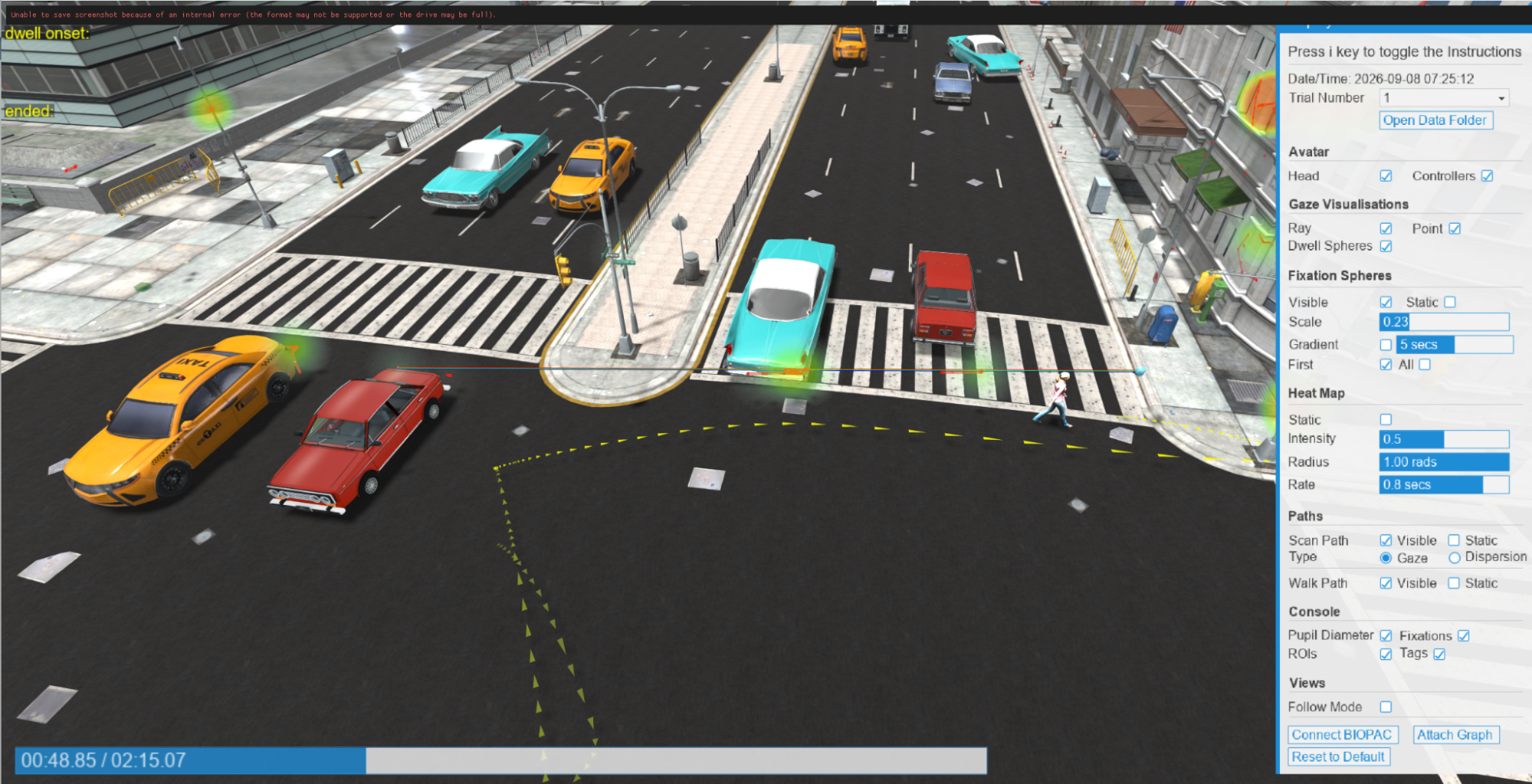
Street Walking example: traffic queued at a signalized intersection.
Vary traffic conditions to explore how participants look, wait, and cross.

Features that turn a scene into a study

Core Features

  • Customizable driving and street walking environments
  • Realistic driving controls (gas, brake, steering)
  • Desktop, VR, gamepad, and supported steering-wheel controls
  • Real-time collision detection and solid-world collision handling
  • Elevation and ramp support
  • Variable speed control and Drive/Reverse shifting
  • Interactive headlights and speed-based engine audio
  • Animated gauges, steering wheels, and tires
  • Driving HUD with speed, fixations, timestamp, and gear status
  • Physical or virtual pedestrian movement
  • Flexible trial start and end conditions
  • Multi-user capabilities
  • Eye tracking, physiological integration, and data collection

Analysis Features

  • Driver and pedestrian attention and fixation tracking
  • Participant position, rotation, velocity, and movement paths
  • Driving and walking speed metrics by trial or condition
  • Traffic count, nearest-vehicle distance, and collision events
  • Custom performance metrics and experiment-event logging
  • Interactive Session Replay
  • Gaze, scan path, and movement path visualization
  • Fixation and heatmap analysis
  • Raw tracking, fixation, trial-timeline, and summary data export
  • Physiological tracking integration
  • Instructor view with real-time control and monitoring

Environmental Features

  • Customizable vehicle models, street scenes, and obstacles
  • Day/night lighting and fog conditions
  • Traffic that follows recorded routes, maintains distance, obeys signals, and yields to participants
  • Per-trial control of traffic count, speed, lights, and yielding
  • In-app traffic route recording
  • Optional animated pedestrians with configurable count and walking speed
  • Ambient city audio and customizable sound effects
  • Speed-based wheel spinning on configured traffic vehicles
  • 360° media integration and additional driving environments
  • Customizable starting positions and traffic routes

Control traffic by trial. Vary vehicle count, speed, traffic lights, whether vehicles yield to the participant and more. Traffic follows recorded lanes, maintains distance from other vehicles, responds to signals, and brakes for obstacles. The lightweight kinematic system uses collision checks rather than requiring a full physics engine. In the Driving Example, the player vehicle also has solid-world collision handling for buildings, props, and other vehicles.
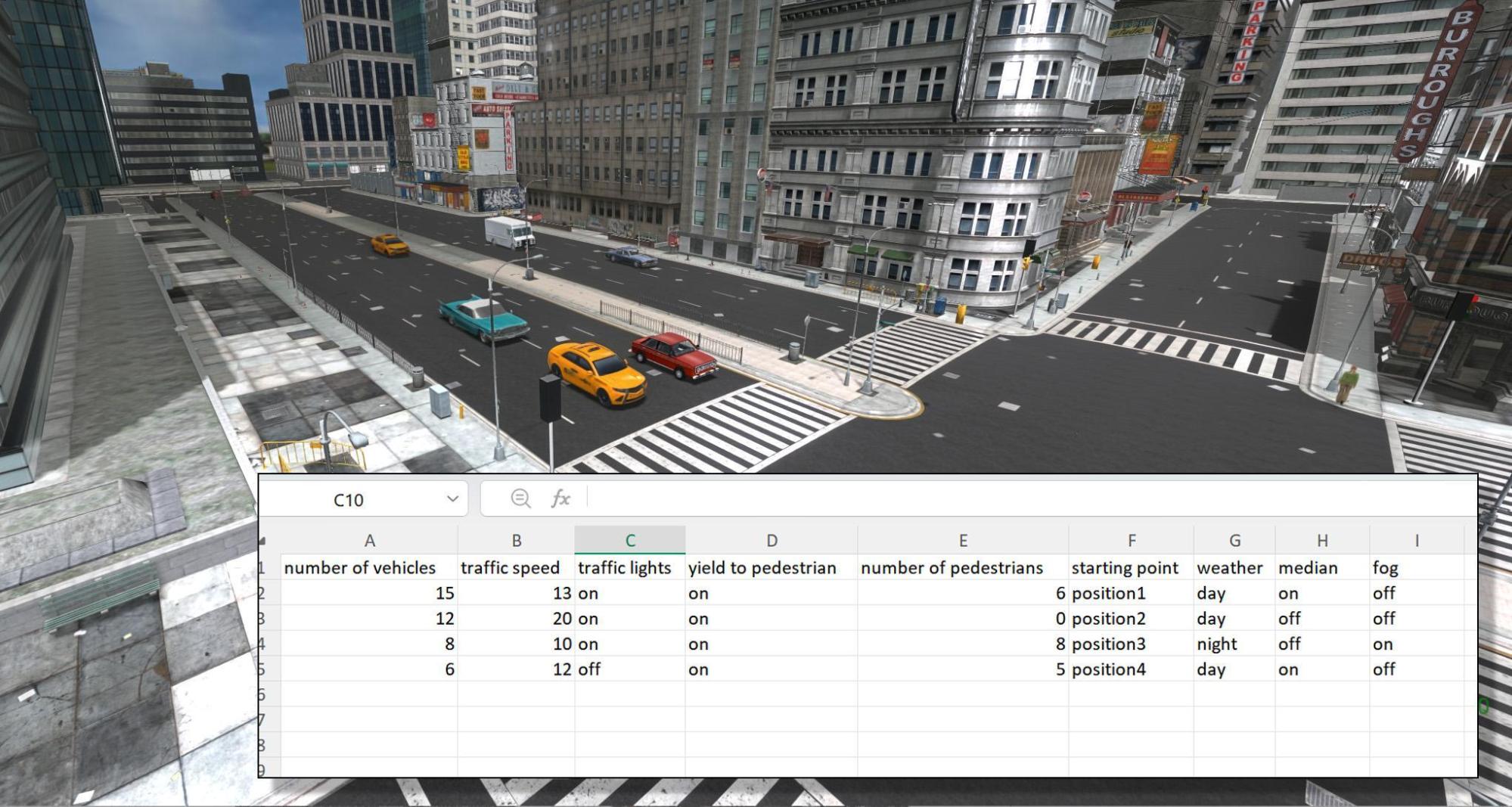
Build streets without rebuilding the 3D environment. Record traffic routes directly inside the running example, including lanes, stop lines, and signal groups. Vehicles can follow those routes across streets, hills, ramps, and bridges. Researchers can also adjust signal timing, traffic spacing, acceleration, braking, and other behavior through the configuration files.
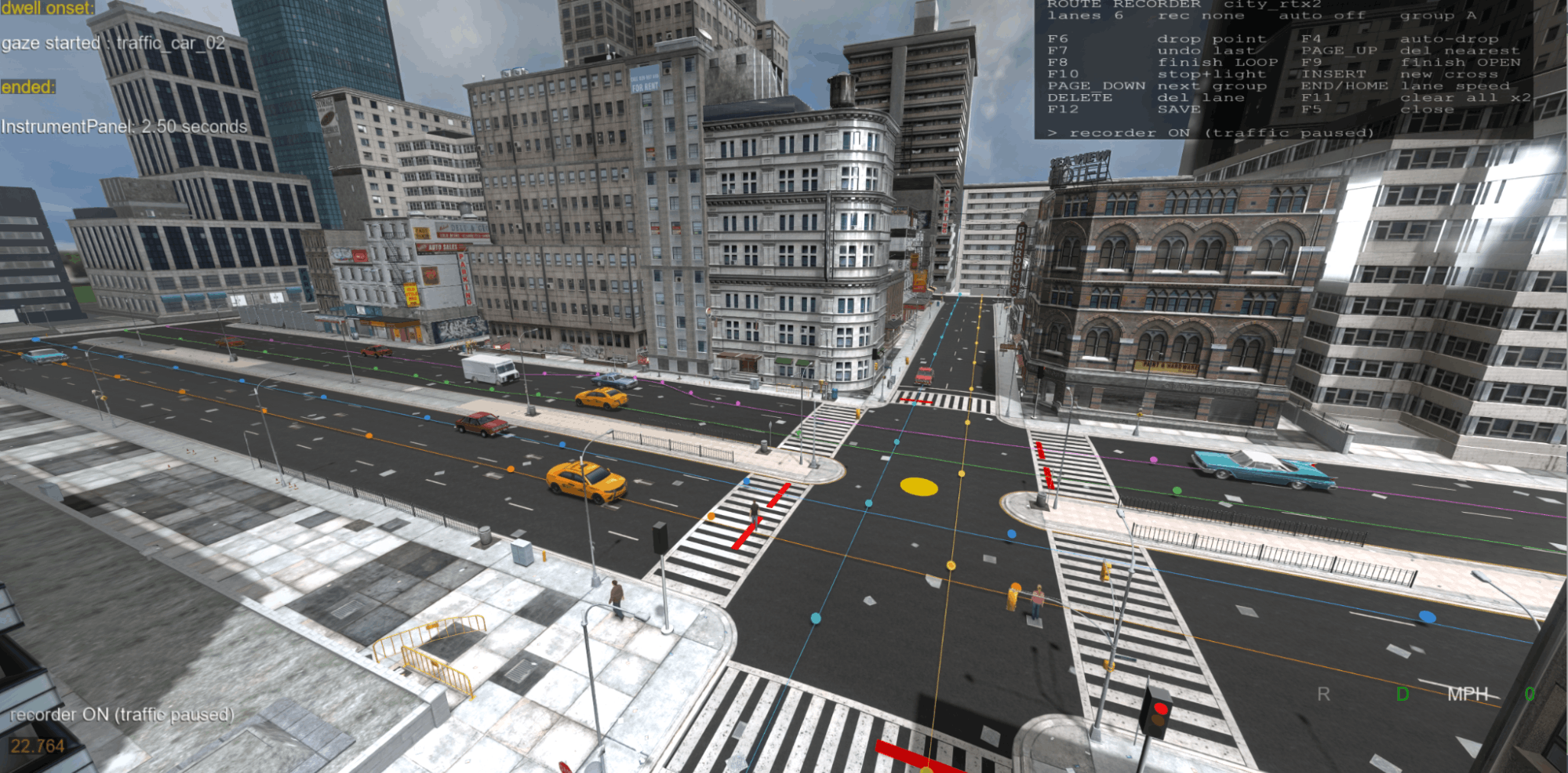
Add pedestrian activity. Optional animated avatars follow sidewalk routes and pause when the participant approaches their path. Their number and walking speed can vary by trial, and dedicated pedestrian routes can be supplied for precise placement. They can also run without moving vehicle traffic when suitable routes are available. These simulated pedestrians are distinct from human participants in a multi-user study.

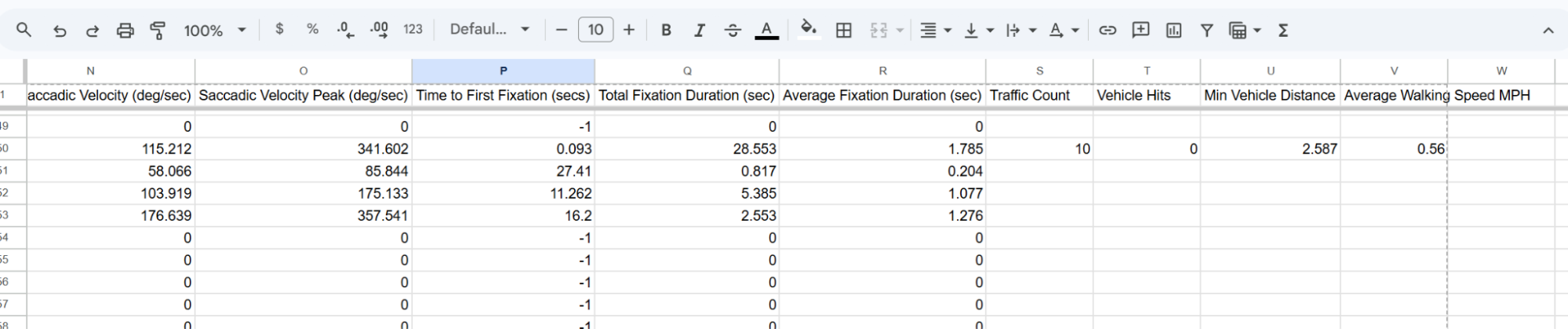
Connect attention to action. Record gaze, fixations, participant movement, vehicle speed, position, rotation, and traffic events. The traffic system can log nearest-vehicle distance, minimum distance, and vehicle hits, while custom events can identify braking, crossing, or other study-specific moments. Review the session spatially in Replay and export the data for further analysis.
Customize the experience. Change environments, vehicles, starting positions, regions and areas of interest, obstacles, lighting, day/night conditions, and fog. Add ambient sound, traffic noise, sirens, or spoken instructions.

Extend with SightLab

Extend the experiment with ratings, questionnaires, timers, proximity triggers, trial randomization, adaptive logic, and custom Python code. Supported SightLab configurations can also add hand, foot, face, and full-body tracking as well as connections to a large collection of supported hardware.. Add much more functionality by leveraging SightLab’s modular tools and features. 

Eye tracking: see what changes before the action

With a supported eye tracker, register vehicles, traffic lights, dashboard controls, signs, hazards, and other objects or Regions of Interest for gaze tracking. Measure dwell time, view counts, and fixations to investigate what participants notice, how long they look, and how attention changes before braking, steering, slowing, or stepping into the road. Optional pedestrian avatars can also be registered as gaze objects in single-user sessions.

SightLab records gaze and movement on the same experiment timeline. For example, a researcher can examine whether a participant looks toward an approaching vehicle, slows near the curb, waits for it to pass, and then continues walking. Waiting time, hesitation, reaction time, and similar study-specific measures can be calculated from the recorded positions, velocities, timestamps, and events.

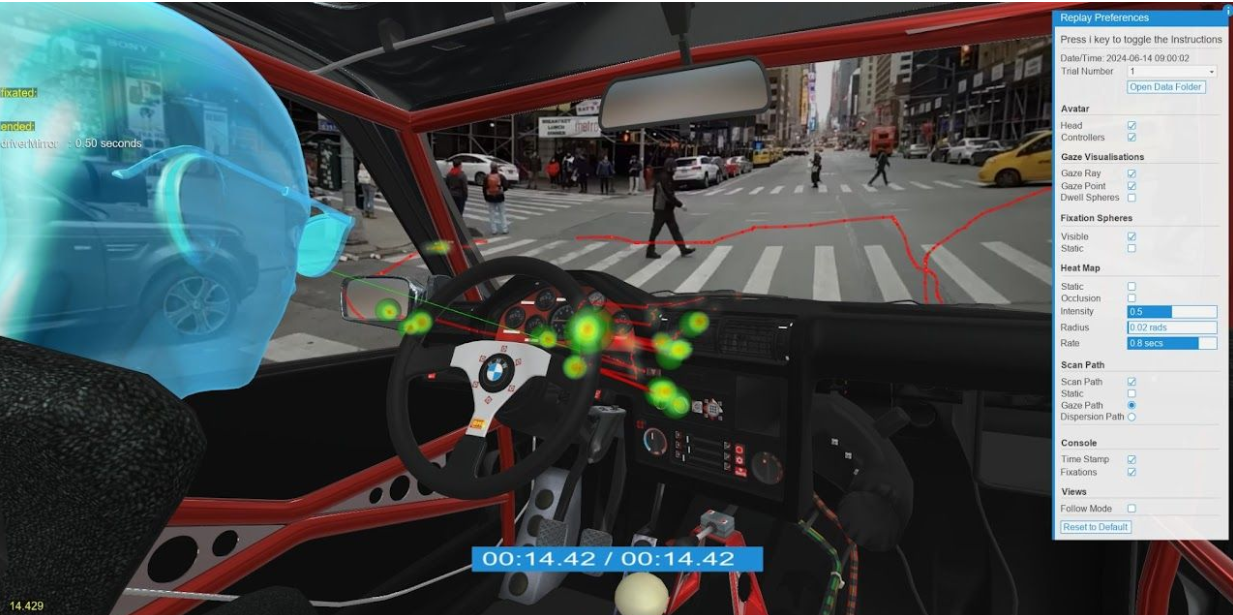
Session Replay reconstructs the recorded experience in the original 3D environment. Inspect walk and drive paths, scan paths, fixation markers, heatmaps, and participant movement together. Follow mode lets you revisit the participant’s perspective, while third-person views make it easier to examine movement through the environment. In the Driving Example, the path visualization can also show vehicle direction and speed.

Export raw tracking, eye-tracking, fixation, trial-timeline, and experiment-summary data for analysis in Python, R, MATLAB, Excel, SPSS, or another research pipeline. Custom values can be added to the trial data and experiment summary.

Connect BIOPAC: relate behavior to physiology

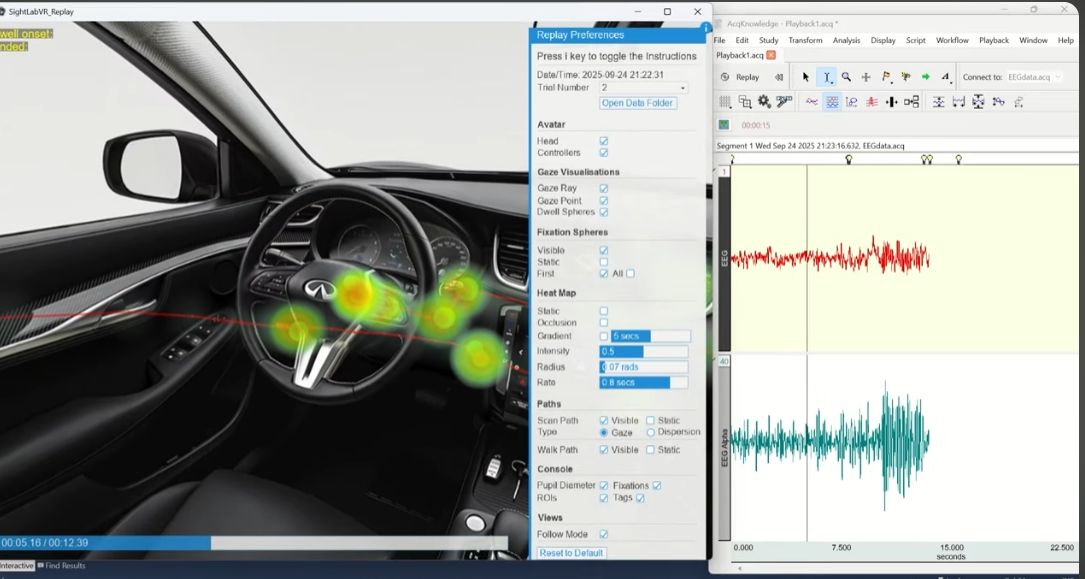
Driving replay with a gaze heatmap beside a synchronized BIOPAC AcqKnowledge graph.
Review physiological activity and VR behavior together.

Pair SightLab with BIOPAC AcqKnowledge to place experiment and fixation markers alongside physiological recordings. Depending on the sensors in your setup, this can help explore how measures such as skin conductance or heart rate change around an approaching vehicle, a crossing decision, or a demanding driving task. Custom event markers can identify moments specific to your study.

For synchronized review, open the matching AcqKnowledge recording, then choose Connect BIOPAC and Attach Graph in SightLab Replay. SightLab 2.6 and AcqKnowledge 6.02 or later support synchronized physiological graphs and VR replay. Additional example scripts demonstrate how to save streamed physiological channels into SightLab trial data and summaries.

Multi-user: study behavior in a shared environment

Multi User sessions let multiple participants experience synchronized traffic in the same study. The server simulates traffic and optional pedestrian avatars, while clients receive their positions. This supports research into shared crossing decisions, group navigation, and how another person’s presence affects attention and movement.

Multi-user Replay can also help researchers examine participants’ movement and gaze together, making it easier to investigate how people coordinate, follow, or respond to one another in a shared environment. SightLab’s broader multi-user framework supports additional custom driving and instructor/participant scenarios.
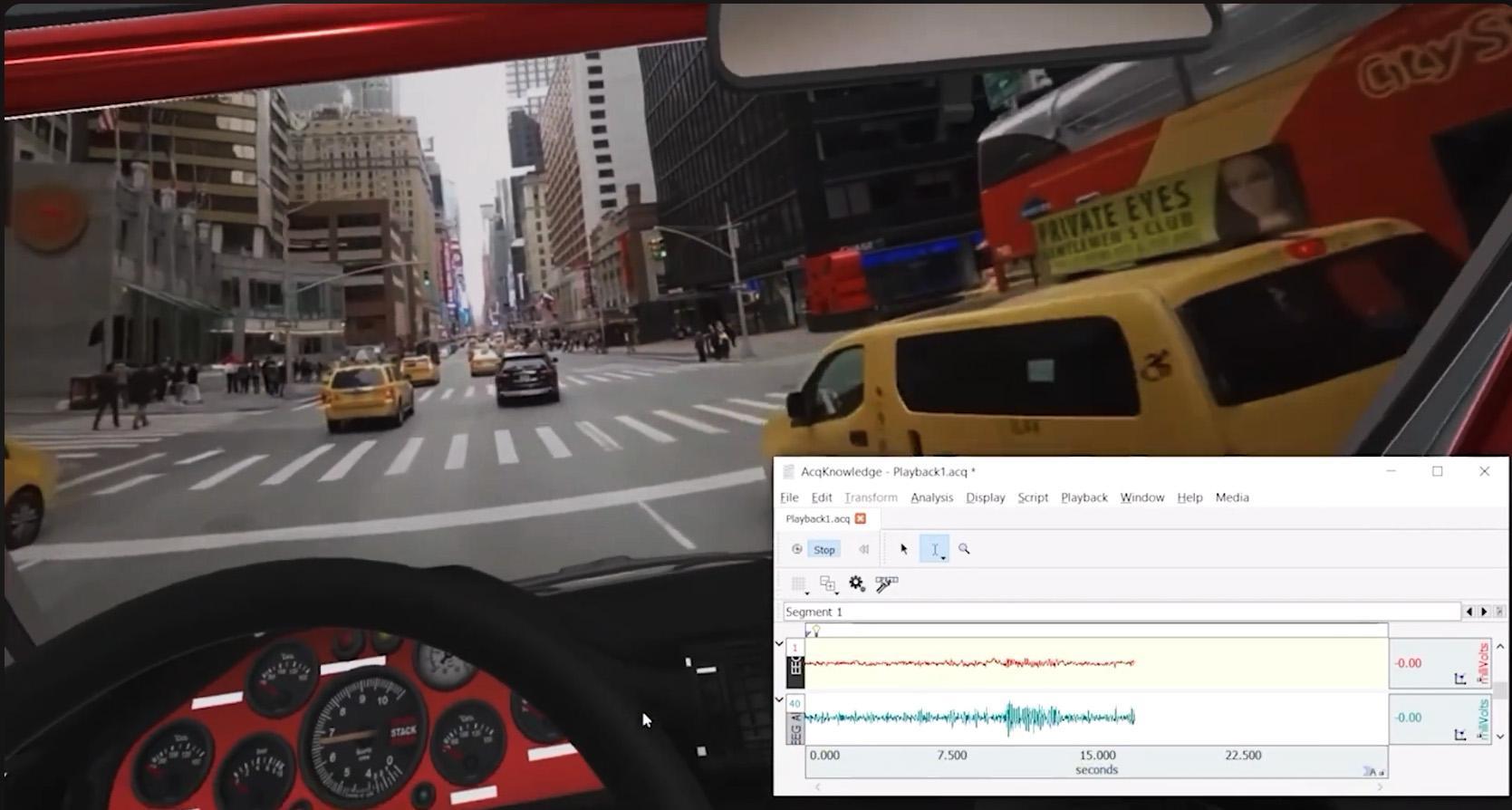
360° Driving Simulator

The additional 360° Driving Simulator uses panoramic video to create a recorded driving experience, including a New York example. It can combine 360° surroundings with 3D elements and provides playback controls such as pause, reset, and seeking. This is useful when a study calls for a consistent recorded journey rather than a fully simulated road sequence.

How to install and run

1. Download the examples. Get the latest versions from the Driving Example and Street Walking Example documentation pages.

2. Open the SightLab Dashboard. Launch the Dashboard from your SightLab installation or project workspace, then find the Driving or Street Walking example.
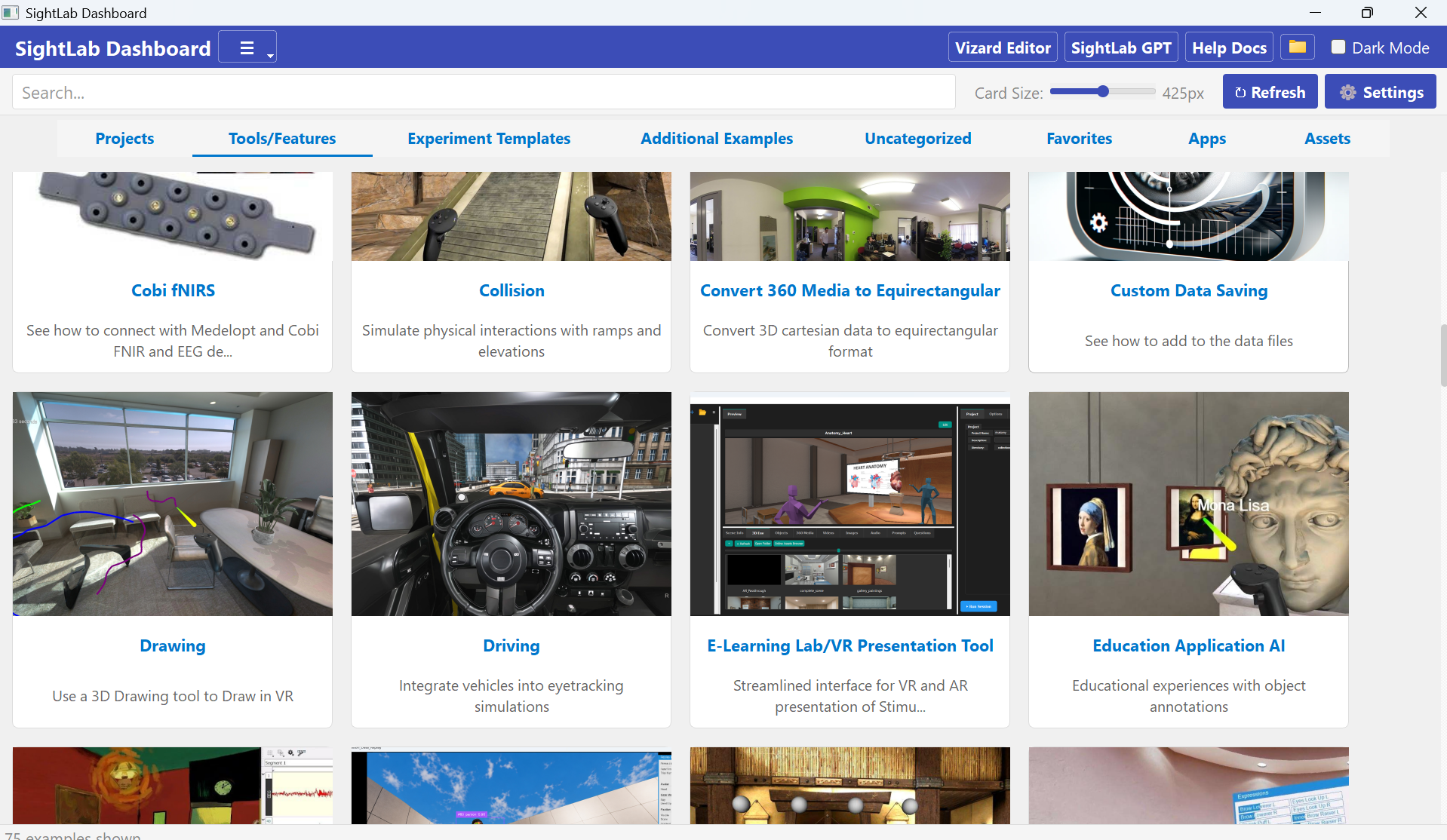
3. Open the example’s Details page. Left-click the example card to access its available actions. For the Street Walking Example, the downloaded ZIP can be dragged onto the Details page to extract the example and display its action buttons.

Left Click to Open the “Details” page

4. Choose your workflow. Use the Dashboard actions to run the GUI or non-GUI session, open Replay, access configuration files, edit the Python code in Vizard, or open the project and Resources folders.

5. Configure traffic and trial conditions. For driving, enable traffic and optional pedestrians in Driving_Config.py. For walking, use traffic_config.py. Edit the STIM file in the Resources folder to vary vehicle count, speed, traffic lights, yielding, and other trial conditions. The Street Walking non-GUI version uses Resources/stim_file-non-GUI.csv.

6. Run, record, and review. Start and end trials using the configured controls or events. The standard Driving Example uses Spacebar to start or proceed to the next trial. After the session, open Replay from the Dashboard to inspect movement, gaze, fixations, and traffic behavior, then export the data for further analysis.

Try this: Compare light and heavy traffic while keeping the environment, vehicle speed, and yielding behavior fixed. Examine changes in gaze, walking or driving speed, and waiting time. Add a post-trial confidence rating, then use custom event markers and BIOPAC to inspect physiological activity around the same moments.

Research and further reading

See the driving paradigm in published research. A study by Cho and colleagues used a virtual highway with billboards to investigate how emotional message content and attentional demands influence visual attention and memory. The researchers combined VR eye tracking with controlled billboard presentations and subsequent recall and recognition measures built on the SightLab Driving Simulator.

Read the published 2025 study: Eyes on VR: Unpacking the Causal Chain Between Exposure, Reception, and Retention for Emotional Billboard Messages

An earlier related study introduced the VR billboard paradigm and examined how gaze behavior and attentional demands relate to incidental memory.

Read the 2023 PLOS ONE study: Examining the exposure-reception-retention link in realistic communication environments via VR and eye-tracking

For a demonstration of the Driving Simulator with physiological recording, see the BIOPAC Driver Psychophysiology webinar.

More SightLab resources: Driving Example | Street Walking Example | BIOPAC integration | Session Replay | Multi-user setup

Explore SightLab for your research

For more information about the Driving and Street Walking examples, additional SightLab functionality, or help planning a research setup, contact WorldViz at sales@worldviz.com.


Request a SightLab demo

Additional Notes

Rating Scales, Instructions

Rest of SightLab

Hardware

Show barchart

Python 

Biopac webinar?

Have Chat check once more

Videos

1:52 in the video

Driving & Street Crossing with SightLab

Explore attention and behavior from the driver’s seat or the sidewalk.

How does an approaching vehicle change where someone looks—and when they decide to act? SightLab’s Driving and Street Walking examples provide customizable starting points for studying driver attention, pedestrian crossing decisions, traffic perception, and navigation in immersive environments. Combine controlled traffic, participant movement, eye tracking, experiment events, and Session Replay in one research workflow.

Two perspectives. One research workflow.

Driving: Put participants behind the wheel using desktop, VR, gamepad, or supported steering-wheel controls. The example includes gas, brake, and steering inputs, Drive/Reverse shifting, speed-sensitive steering, collision handling, and elevation support. Configurable vehicle models can include animated steering wheels, RPM and MPH gauges, tires, headlights, and engine audio that changes with speed. A HUD can display speed, fixations, time, and gear status.

The Driving Example combines customizable vehicle controls, traffic, and eye-tracking data collection.

Street walking: Let participants physically or virtually move through a street environment while studying visual search, approach speed, stopping, hesitation, and crossing behavior. Add moving traffic, optional animated pedestrians, ambient city audio, and customizable trial conditions. Included server/client scripts also provide a starting point for synchronized multi-user pedestrian studies.

Vary traffic conditions to explore how participants look, wait, and cross.

Features that turn a scene into a study

Core Features

  • Customizable driving and street walking environments
  • Realistic driving controls (gas, brake, steering)
  • Desktop, VR, gamepad, and supported steering-wheel controls
  • Real-time collision detection and solid-world collision handling
  • Elevation and ramp support
  • Variable speed control and Drive/Reverse shifting
  • Interactive headlights and speed-based engine audio
  • Animated gauges, steering wheels, and tires
  • Driving HUD with speed, fixations, timestamp, and gear status
  • Physical or virtual pedestrian movement
  • Flexible trial start and end conditions
  • Multi-user capabilities
  • Eye tracking, physiological integration, and data collection

Analysis Features

  • Driver and pedestrian attention and fixation tracking
  • Participant position, rotation, velocity, and movement paths
  • Driving and walking speed metrics by trial or condition
  • Traffic count, nearest-vehicle distance, and collision events
  • Custom performance metrics and experiment-event logging
  • Interactive Session Replay
  • Gaze, scan path, and movement path visualization
  • Fixation and heatmap analysis
  • Raw tracking, fixation, trial-timeline, and summary data export
  • Physiological tracking integration
  • Instructor view with real-time control and monitoring

Environmental Features

  • Customizable vehicle models, street scenes, and obstacles
  • Day/night lighting and fog conditions
  • Traffic that follows recorded routes, maintains distance, obeys signals, and yields to participants
  • Per-trial control of traffic count, speed, lights, and yielding
  • In-app traffic route recording
  • Optional animated pedestrians with configurable count and walking speed
  • Ambient city audio and customizable sound effects
  • Speed-based wheel spinning on configured traffic vehicles
  • 360° media integration and additional driving environments
  • Customizable starting positions and traffic routes

From customizable scenes to controlled experiments

Control traffic by trial. Compare light and heavy traffic, change vehicle speeds, adjust signal timing, or test yielding behavior while keeping other conditions consistent. Traffic follows recorded routes and responds to signals, obstacles, and the participant. The lightweight kinematic system uses collision checks rather than requiring a full physics engine.

Build streets without rebuilding the 3D environment. Record lanes, stop lines, and signal groups directly in the running example. Add traffic to new environments, including roads with curves, hills, ramps, and bridges, without requiring a separate 3D modeling tool. Researchers can further adjust traffic spacing, acceleration, braking, and other behavior through configuration files.

Add pedestrian activity. Populate sidewalks with animated avatars and vary their number, walking speed, and routes. Simulated pedestrians can pause when the participant approaches their path, helping researchers introduce additional visual and social activity. They can also run without moving vehicle traffic when suitable routes are available.

Connect attention to action. Examine gaze, fixations, movement, speed, and traffic events together. Use recorded positions, velocities, timestamps, and custom events to investigate behaviors such as braking, waiting, hesitation, and crossing decisions.

Customize and extend the experience. Change environments, vehicles, starting positions, objects and Regions of Interest, obstacles, lighting, and audio. Add instructions, ratings, questionnaires, adaptive trials, physiological integrations, and custom Python functionality using SightLab’s modular tools. Supported configurations can also incorporate hand, foot, face, and full-body tracking, avatars, and additional hardware.

Eye tracking: see what changes before the action

With a supported eye tracker, register vehicles, traffic lights, dashboard controls, signs, hazards, and other objects or Regions of Interest for gaze tracking. Measure dwell time, view counts, and fixations to investigate what participants notice, how long they look, and how attention changes before braking, steering, slowing, or stepping into the road. Optional pedestrian avatars can also be registered as gaze objects in single-user sessions.

SightLab records gaze and movement on the same experiment timeline. For example, a researcher can examine whether a participant looks toward an approaching vehicle, slows near the curb, waits for it to pass, and then continues walking. Waiting time, hesitation, reaction time, and similar study-specific measures can be calculated from recorded positions, velocities, timestamps, and events.

Session Replay reconstructs the recorded experience in the original 3D environment. Inspect walk paths, scan paths, fixation markers, heatmaps, and participant movement together. Follow mode lets you revisit the participant’s perspective, while third-person views make it easier to examine movement through the environment. Driving Replay can also visualize vehicle direction and speed along the recorded path.

Export raw tracking, eye-tracking, fixation, trial-timeline, and experiment-summary data for analysis in Python, R, MATLAB, Excel, SPSS, or another research pipeline. Custom values can be added to trial data and experiment summaries.

Connect BIOPAC: relate behavior to physiology

Pair SightLab with BIOPAC AcqKnowledge to place experiment and fixation markers alongside physiological recordings. Depending on the sensors in your setup, this can help explore how measures such as skin conductance or heart rate change around an approaching vehicle, a crossing decision, or a demanding driving task. Custom event markers can identify moments specific to your study.

For synchronized review, open the matching AcqKnowledge recording, then choose Connect BIOPAC and Attach Graph in SightLab Replay. SightLab 2.6 and AcqKnowledge 6.02 or later support synchronized physiological graphs and VR replay. Additional example scripts demonstrate how to save streamed physiological channels into SightLab trial data and summaries.

Review physiological activity and VR behavior together.

For setup instructions and supported configurations, see the BIOPAC integration guide.

Multi-user: study behavior in a shared environment

The Street Walking server/client scripts let multiple participants experience synchronized traffic in the same study. The server simulates traffic and optional pedestrian avatars, while clients receive their positions. This supports research into shared crossing decisions, group navigation, and how another person’s presence affects attention and movement.

Multi-user Replay can also help researchers examine participants’ movement and gaze together, making it easier to investigate how people coordinate, follow, or respond to one another in a shared environment. SightLab’s broader multi-user framework supports additional custom driving and instructor/participant scenarios.

360° Driving Simulator

The additional 360° Driving Simulator uses panoramic video to create a recorded driving experience, including a New York example. It can combine 360° surroundings with 3D elements and provides playback controls such as pause, reset, and seeking. This is useful when a study calls for a consistent recorded journey rather than a fully simulated road sequence.

The Driving guide also describes an expanded package with additional city maps and a longer-road/highway example. The 360° simulator is a separate download available upon request; contact WorldViz for the appropriate package and setup.

Combine recorded panoramic surroundings with a virtual driving experience.

How to install and run

1. Download the examples. Get the latest versions from the Driving Example and Street Walking Example documentation pages.

2. Open the SightLab Dashboard. Launch the Dashboard from your SightLab installation or project workspace, then find the Driving or Street Walking example.

3. Open the example’s Details page. Left-click the example card to access its available actions. For the Street Walking Example, the downloaded ZIP can be dragged onto the Details page to extract the example and display its action buttons.

4. Choose your workflow. Use the Dashboard actions to run the GUI or non-GUI session, open Replay, access configuration files, edit the Python code in Vizard, or open the project and Resources folders.

5. Configure traffic and trial conditions. For driving, enable traffic and optional pedestrians in Driving_Config.py. For walking, use traffic_config.py. Edit the STIM file in the Resources folder to vary vehicle count, speed, traffic lights, yielding, and other trial conditions. The Street Walking non-GUI version uses Resources/stim_file-non-GUI.csv.

6. Run, record, and review. Start and end trials using the configured controls or events. The standard Driving Example uses Spacebar to start or proceed to the next trial. After the session, open Replay from the Dashboard to inspect movement, gaze, fixations, and traffic behavior, then export the data for further analysis.

Try this: Compare light and heavy traffic while keeping the environment, vehicle speed, and yielding behavior fixed. Examine changes in gaze, walking or driving speed, and waiting time. Add a post-trial confidence rating, then use custom event markers and BIOPAC to inspect physiological activity around the same moments.

Research and further reading

See the driving paradigm in published research. A study by Cho and colleagues used a virtual highway with billboards to investigate how emotional message content and attentional demands influence visual attention and memory. The researchers combined VR eye tracking with controlled billboard presentations and subsequent recall and recognition measures built on the SightLab Driving Simulator.

Read the published 2025 study: Eyes on VR: Unpacking the Causal Chain Between Exposure, Reception, and Retention for Emotional Billboard Messages

An earlier related study introduced the VR billboard paradigm and examined how gaze behavior and attentional demands relate to incidental memory.

Read the 2023 PLOS ONE study: Examining the exposure-reception-retention link in realistic communication environments via VR and eye-tracking

For a demonstration of the Driving Simulator with physiological recording, see the BIOPAC Driver Psychophysiology webinar.

More SightLab resources: Driving Example | Street Walking Example | BIOPAC integration | Session Replay | Multi-user setup

Explore SightLab for your research

For more information about the Driving and Street Walking examples, additional SightLab functionality, or help planning a research setup, contact WorldViz at sales@worldviz.com.

Request a SightLab demo

Stay Updated
Subscribe to our monthly Newsletter
CONTACT US 
Phone +1 (888) 841-3416
Fax +1 (866) 226-7529
813 Reddick St
Santa Barbara, CA 93103